
Takeover 2 Parry Timing: How to Counter Every Attack
A practical guide to Takeover 2's parry: the timing window, the counter, which attacks to parry and why whiffing a parry is now genuinely dangerous.
Takeover 2's parry is a short active window that turns a committed enemy attack into a free counter. The counter is on the punch button, and a missed parry leaves you exposed because the June patch removed its invincibility frames. Source: Takeover 2 on Steam ↗
The parry is the most important change in Takeover 2. The first game asked you to block or eat the hit; the sequel asks you to meet the attack on purpose. Get it right and you steal the turn. Get it wrong and you are standing still in front of a man with a pipe.
This page explains the timing in practical terms, the attacks worth parrying, and the habits that separate a player who parries from a player who gambles.
What the parry actually does
A successful parry stops the incoming attack, puts the attacker into a stunned state and opens a counter window. The counter is mapped to the punch button, so you do not have to switch stance or reach for a separate button after the parry. That design is deliberate: it keeps the offensive layout under your thumb and makes the transition from defence to combo feel like one motion.
The parry is not a block. It does not absorb a combo, it does not protect you while you hold it, and it does not give you a free escape if you mistime it. It is a read.
The June 10 patch made that explicit by removing the i-frames from the kick parry and reducing the healing a parry provides. In plain language: the developer did not want players to sit in a defensive loop and heal back to full. A parry is a gamble with a reward, not a safety net.
The timing window in practical terms
The window is short. You want to press parry as the attack is about to connect, not when the enemy starts winding up and not after the hit has already landed. The visual cue is the moment the attack commits: the shoulder turns, the weapon reaches the top of its arc, the foot plants. That is the frame to react to.
Three rules make the timing easier:
- Parry the commit, not the start. A wind-up is not an attack yet. If you parry at the first frame of the animation, you will whiff before the hit is active.
- Watch the weapon, not the body. Big enemies have long wind-ups and small enemies have short ones. The weapon or fist tells you when the hit is coming; the torso tells you what kind of hit it is.
- Do not parry twice. If the first parry whiffs, the recovery is your punishment window. Hold the direction away and reset instead of mashing the button.
The slowdown effect on a successful parry is your confirmation. It is also a rhythm change: the game briefly slows, then returns to speed for the counter. Do not let the effect lull you into a late counter. Press punch as soon as the parry connects.
Which attacks to parry
Not every attack deserves a parry. The system rewards selectivity.
Parry these:
- Single committed swings from pipe, bat or fist enemies. These have clear wind-ups and a long recovery if you catch them.
- Boss overheads and lunges. The big, telegraphed moves are designed to be parried. The fast jabs usually are not.
- The first hit of a group. A parry on the lead enemy buys you a moment to reposition before the second enemy swings.
Do not parry these:
- Multi-hit flurries. A parry stops one hit, not the follow-up. Dodge out or block instead.
- Attacks from off-screen. You cannot read a wind-up you cannot see. Move first, parry second.
- Projectiles at long range. Close the distance or use the environment; do not stand still trying to time a parry on a bullet.
- Anything you have not seen before. Eat the first hit at range, learn the tell, then parry the second.
Against bosses, the rule is even stricter. Parry the move you recognize, punish with a short confirm, then reset. A boss punish that lasts too long is how a good parry turns into a lost health bar.
The parry counter
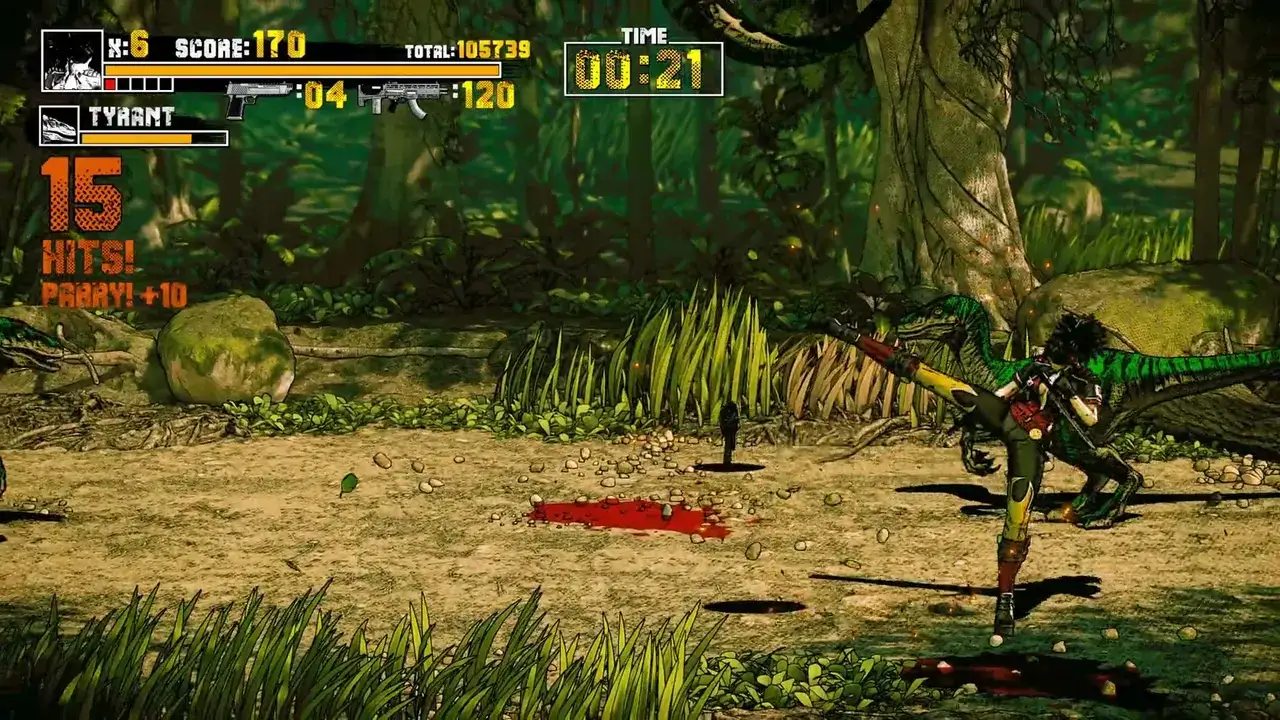
The counter is the reward, and it is also a combo starter. After a successful parry, press punch. The counter should stagger the enemy long enough for two or three normals, and from there you can choose a launcher or a finisher.
The common mistake is treating the counter as a finisher. It is not. It is a free opener. Use it to start the route you already know: counter, light chain, launcher, juggle, finisher. If the enemy is a boss, stop after the light chain and reset.
The second common mistake is countering into a crowd. The counter only affects the enemy you parried. The enemy behind you is still winding up. If you parried in the middle of a group, take the counter and immediately move; do not stand there finishing a combo while three other enemies close in.
Drills that build the read
Drill 1: parry only. Pick the first stage and parry every single attack you can identify. Do not counter. Do not attack. Just parry and reset. You will lose health, and that is fine. The goal is to learn the tells without the pressure of a combo.
Drill 2: parry and stop. Add the counter, then stop attacking. This teaches you that the parry is a turn, not a damage window. Once the stop is automatic, add two normals.
Drill 3: one enemy type at a time. Pick a stage with a mixed group and focus on one enemy type per run. Parry only the pipes, then only the kicks, then only the grabs. The game's enemy design is readable once you isolate the tells.
Drill 4: boss parry. Fight the first boss and parry only the big overhead. Ignore everything else. You will learn the one move that matters, and you will stop panic-parrying the fast attacks.
The demo's practice level is built for this. Ten minutes of parry-only practice is worth more than an hour of ranked attempts.
Parry in co-op
Local co-op makes the parry easier and harder at the same time. Easier because a partner can hold the crowd while you focus on the boss tell. Harder because two players attacking the same enemy create visual noise, and the parry flash is harder to read when the screen is full of hit effects.
Assign roles. One player parries the boss; the other clears the adds. Do not both parry the same attack, and do not both commit to a long combo at the same time. If you are playing through Remote Play Together, expect a little extra input latency and parry earlier than you would locally.
When the parry is not working
If you are consistently whiffing, the problem is usually one of three things:
- You are watching the enemy's feet. Watch the weapon or the shoulders. The feet tell you where the enemy will land, not when the hit is active.
- You are parrying on reaction to the sound. The audio cue arrives with the hit, which is too late. Use the visual wind-up.
- You are holding the parry button. The parry is a press, not a stance. If your finger is already down, you are not timing anything.
Turn the music down and the effects up if you are learning. The parry's audio cue is useful once you know the visual tell, but it is not a substitute for it.
Once parries are reliable, the difficulty and S-rank guide→ explains how the scoring changes.
FAQ
What button is parry in Takeover 2?
The patch notes refer to the "kick parry", and the counter is mapped to the punch button. The full game supports remapping, so check your control settings and bind parry to a button you can tap without moving your thumb.
Does a missed parry have invincibility frames?
No. The June 10 patch removed the i-frames from the kick parry. A missed parry leaves you exposed, which is why selective parrying matters.
Can you parry every attack?
No. Single committed swings and telegraphed boss moves are the good targets. Multi-hit flurries, off-screen attacks and projectiles are better dodged or avoided.
Sources
- Takeover 2 on Steam ↗
- Steam news and the June 10 combat patch ↗
- r/BeatEmUps: Mania clear and parry discussion ↗
- Takeover 2 reveal trailer breakdown ↗
Official source: Takeover 2 on Steam ↗ Takeover 2 guides and walkthroughs